Invoicing and treatment plans for dental practices
Your practice isn't just healthcare. It's also a business.
Dentasys runs the practice's accounts from the patient file: treatment plans that AI drafts from what the dentist dictates, payments, the daily cash drawer, payment plans, sequentially numbered invoices, credit notes, insurers, expenses and production per dentist. Your accountant gets the invoice spreadsheet and the annual third-party report without anyone retyping a thing.

Convert more treatment plans
Don't send a PDF and forget about it: follow up every proposal and you'll know how much money is on the table in treatments waiting for approval.
- Treatment plans from the chart history or dictated to the AI.
- Statuses: pending, delivered, accepted and follow-up.
- Financing plans and split payments.
Hassle-free billing
Invoices and credit notes linked to each treatment, numbered the way the law requires and ready for your accountant.
What you save:
- • Sequential numbering per year and a separate series for credit notes.
- • PDF invoice sent to the patient over WhatsApp.
- • Spreadsheet for your accountant and annual third-party report.

Data-Driven Decisions
Which treatment is most profitable? Which doctor produces the most? How many new patients came this month? Dentasys answers without you having to calculate anything.
Dental treatment plans that get accepted more often
A treatment plan is created from the patient's history or with the AI assistant: the dentist says «root canal on 16 and a scale and polish» and Dentasys finds the treatments in the patient's fee schedule and drafts the plan for review. Discounts can be requested by voice, on one treatment or on the total, and the maths is done by the software, not the AI.
The plan includes the printed dental chart, the «Includes» text for each treatment and, if the practice offers financing, the monthly payment for each plan. You can give the patient two options, such as braces or clear aligners: when they accept one, the other is automatically marked «Discarded» and does not count as a no.
Follow-up: no treatment plan left in a drawer
Each treatment plan has a status: pending, delivered, accepted, rejected or follow-up. If the patient wants time to think, you set the next contact date, and the «Follow-up» box shows how many are waiting for a call. When a plan is rejected, you record the reason, so you learn why treatments are lost.
«Pending production» shows the value of accepted plans whose treatments have not been done yet, and the «Patients to contact» list shows who accepted, still has work outstanding and has no appointment. It is reception's call list.
Payments, daily cash drawer and payment plans
Payments are recorded in the patient file by ticking the treatments being paid and the payment method: cash, card, bank transfer, Bizum, financing, payment plan or insurer. The payments screen groups them all by month and by method. The cash drawer is opened in the morning and closed at night, with cash payments added automatically and the expected balance always in view.
For long treatments, the payment plan keeps what was agreed with the patient and reminds you each month what is due. If instalments are paid by direct debit, Dentasys prepares the SEPA batch XML file for you to upload to your bank.
Dental invoicing that follows the law
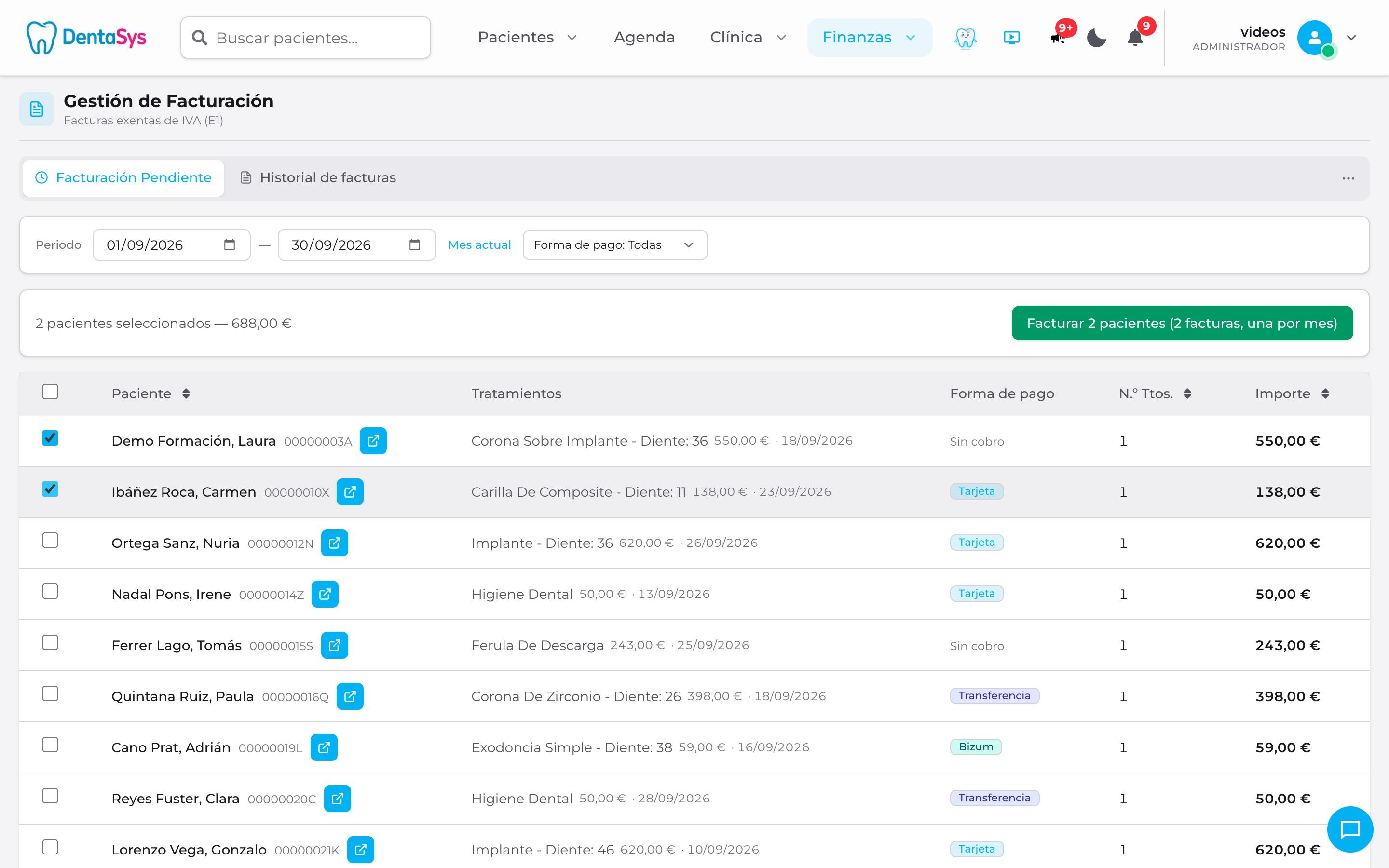
Invoices are issued from «Pending invoicing», which lists patients with completed treatments that have not been invoiced. Dentasys numbers them automatically, in sequence and with no gaps: F2026-00001 for standard invoices and a separate series, R2026-00001, for credit notes. An issued invoice cannot be deleted: if there is a mistake, you issue a full or partial credit note with its reason.
Orthodontics paid monthly is invoiced phase by phase, an invoice for an older treatment carries both the treatment date and the issue date, and for a minor the invoice is made out to the parent or guardian who pays. Insurer billing shows how much each insurer owes every month and when it has paid.
What your accountant needs, in one click
From the invoice history, «Export for accountant» downloads a spreadsheet with every invoice in the chosen dates: number, dates, tax ID, description, amounts and whether it is a credit note. The «Form 347» screen prepares the Spanish annual report of everyone billed more than €3,005.06 in the year, with the amount for each quarter.
Expenses are recorded by uploading a photo of the supplier's invoice: the AI fills in the fields and you check them. That way the finance dashboard shows what comes in, what goes out and what is still to be collected.
Statistics and production per dentist
The statistics screen brings together, in tabs, the calendar and chair time, treatment plans, patients, production and finances, all with the same dates. Production per dentist works out the value of each clinician's work and their commission, and each dentist sees their estimated commission for the month on their home screen. The «Patients» tab also shows how patients found you: Google, a friend, advertising…
And if you would rather ask, Dasy, the Dentasys assistant, answers «how much have we taken this month?» or «how many treatment plans are waiting for approval?» with a card of figures, and lets you download all of the month's invoices in a single PDF.
Invoicing and treatment plans: frequently asked questions
What practice managers and accountants usually ask.
Can Dentasys handle invoicing for a dental practice?
Yes. It issues invoices with sequential numbering per year, credit notes with their own series, invoices in the payer's name, phased invoicing and insurer billing, and exports the spreadsheet your accountant asks for.
How does the AI treatment plan work?
The dentist dictates or types what needs doing and the AI drafts the plan with the treatments from the patient's fee schedule. Prices and discounts are calculated by Dentasys, and nothing is saved until someone has reviewed it.
Can I offer financing or payment in instalments?
Yes, in two ways. With financing, a bank or finance company pays the practice and the treatment plan shows the monthly payment for each plan you set up. With a payment plan, the patient pays the practice in instalments and Dentasys reminds you each month what is due.
Can I see how much each dentist produces?
Yes. The «Production per dentist» screen lists the treatments completed by each clinician and works out their commission using the percentages and costs you configure.
Does invoicing cost extra?
No. Treatment plans, payments, cash drawer, invoicing and statistics are included in the €80/month + VAT fee, with no extra modules. Only voice usage, WhatsApp and extra AI credits are charged separately.
Want to see your business health?
Free demo · 30 minutes · No commitment